a. ANDY / ATSINNA
SECURITY & NETWORKS / LEARNING IN PUBLIC

Understand
the network.
Question the noise.

I’m Andy. I’m applying security and networking principles in my home lab, with the goal of monitoring activity and detecting anomalies on my network. This project is a way to test my understanding of SIEM concepts and learn through hands-on work in my own environment.

Explore my work
PERSONAL LAB. REAL OBSERVATIONS.01 — ONGOING PROJECT
01 / SELECTED WORKDOCUMENTATION → VISIBILITY → DETECTION
ONGOING • FOUNDATION STAGE

Home Network
Security Lab.

Understanding the environment before building the monitoring. A record of my network inventory, Windows baseline, and the questions that followed.

17Inventoried devices
03Connection groups
02Investigation notes
Explore the repository
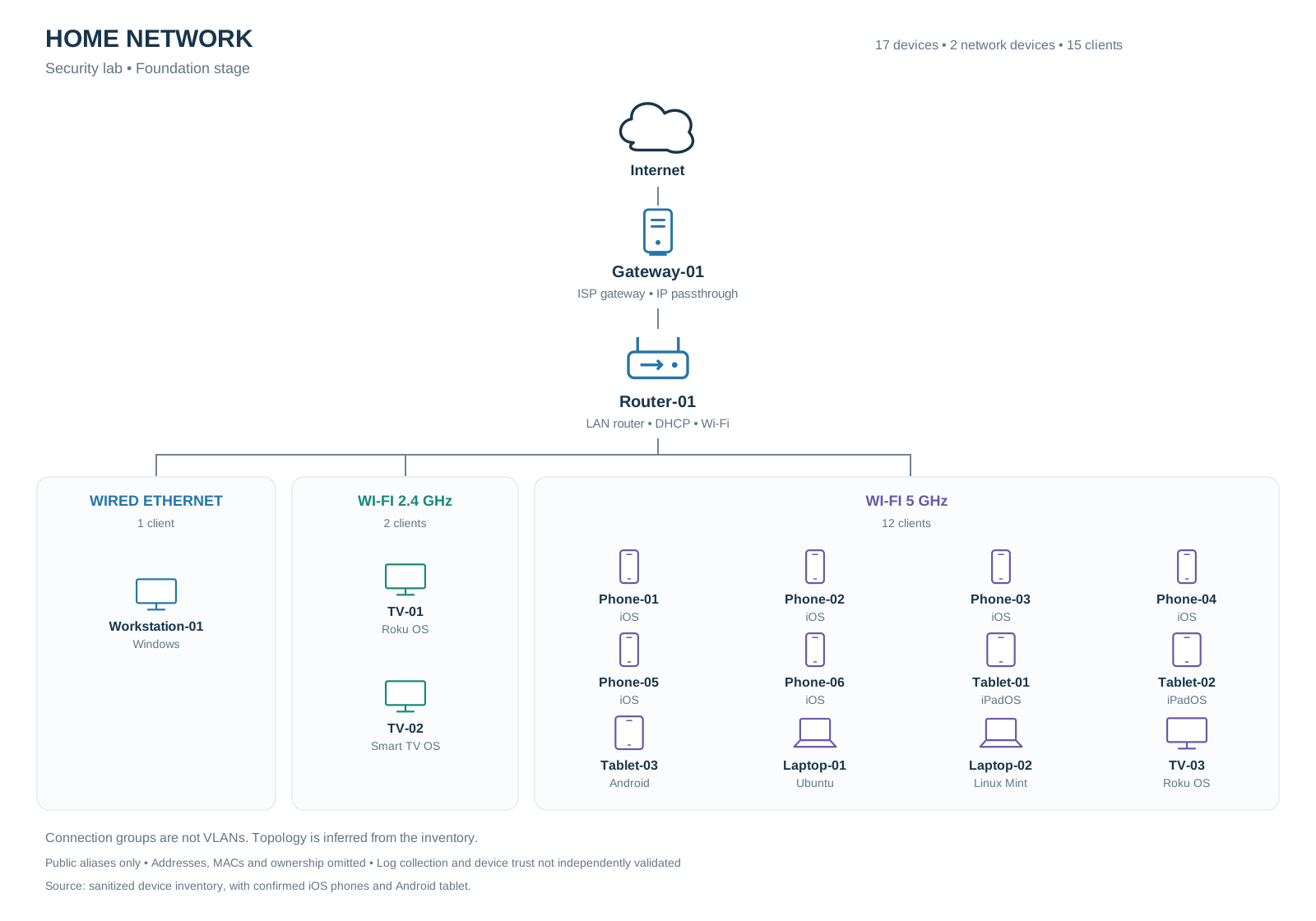
NETWORK TOPOLOGYOpen full diagram
Internet connects to a gateway and router, then one wired workstation, two 2.4 GHz TVs and twelve 5 GHz clients: six phones, three tablets, two laptops and a TV.
Generic device names. No real IPs, MACs, or ownership details. Download diagram files

What I documented

A 17-device inventory, an inventory-based topology, established TCP connections, listening services, limited DNS observations, and Windows logon events.

PowerShellWiresharkEvent ViewerWindows

Where the work stands

The initial baseline is documented. Hardening validation and centralized monitoring are next. The connection groups are not VLANs, and the snapshots are not continuous monitoring.

See the next steps
02 / INVESTIGATION NOTESFOLLOWING THE EVIDENCE

From unfamiliar
to understood.

The useful part is the reasoning: what I observed, how I checked it, and what remains unconfirmed.

01
SERVICES & INTERFACES

What’s behind that listener?

Unfamiliar service names and a TCP port 139 listener led to a closer look at Windows service details and network adapters.

FINDING

jhi_service identified an Intel service; GameManagerService3 identified Razer software. Adapter inspection identified a VirtualBox host-only interface.

Still open: firewall reachability and internet exposure were not assessed. A familiar service name alone does not establish safety.

METHOD

Service inspection
Address-to-interface lookup
Adapter identification

Project documentation
02
WINDOWS AUTHENTICATION

A failed logon needs context.

A reviewed Event 4625 targeted the disabled Guest account. I examined the logon type, caller process, status fields, and available source information.

FINDING

Substatus 0xC0000072 indicated a disabled-account failure. The caller field listed Windows Explorer; no source network address was recorded.

Still open: the triggering action was not confirmed. This observation does not establish either an attack or a harmless cause.

METHOD

Event field review
Status interpretation
Documented uncertainty

Project documentation
03 / ABOUT MY APPROACH

Learn by doing.
Explain the why.

I’m learning security and networking by working through the systems I use every day.

My home lab gives me a place to practice asset documentation, examine normal activity, and build toward a small security monitoring environment. I keep the questions and limitations alongside the findings.

I publish sanitized documentation so the work can be reviewed without exposing household information.

Follow my work on GitHub
04 / WHAT’S NEXTA LAB IN PROGRESS

Building the foundation
for better visibility.

01IN PROGRESS

Foundation

Refine the baseline and validate network and endpoint hardening.

02PLANNED

Visibility

Select one monitoring platform and verify that endpoint events arrive.

03PLANNED

Detection & response

Test understandable detections and document controlled investigations.